
After Installation: Commissioning, Monitoring & First 30 Days
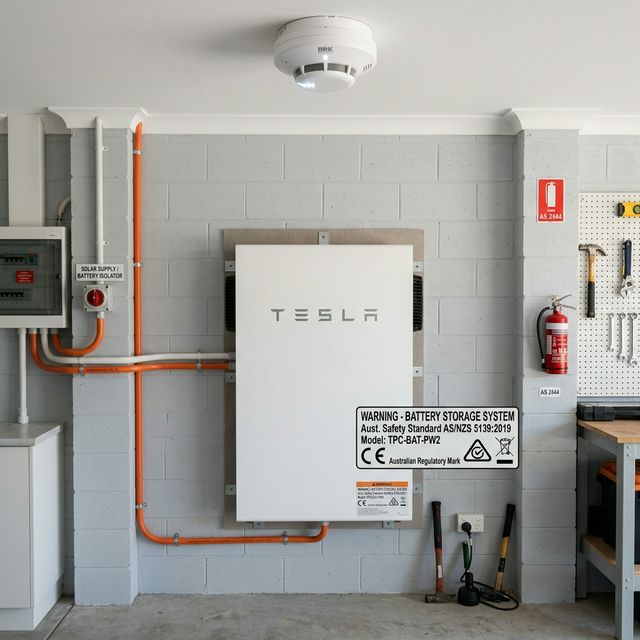
Your battery is installed and the installer is packing up their van. What happens next? The commissioning and first-month period is important — it's when you should confirm everything is working correctly, set up your monitoring, and identify any issues before the installer is long gone. Here's what to do.
Day 1: What Should Happen at Commissioning

Before your installer leaves, they should complete a commissioning process and hand over the system to you. This should include:
- System function test: The installer should demonstrate that the battery is charging from solar and discharging correctly. You should see the system working in real time before they leave.
- App setup: Your monitoring app should be installed on your phone and showing live data. If it's not working before the installer leaves, ask them to stay until it is.
- Scheduling configuration: Any time-based charging/discharging settings should be configured (ideally aligned with your electricity tariff). If the installer doesn't know what your peak hours are, tell them — this setup is part of what you're paying for.
- Backup mode demonstration: If your system has backup/islanding capability, ask the installer to demonstrate or explain exactly what happens when the grid goes down and how to verify backup mode is active.
- Physical paperwork: You should receive copies of all warranties (product and workmanship), the completion certificate, any grid connection/DNSP approval documentation, and your CHBP rebate confirmation if applicable.
The Monitoring App: What to Check Daily for the First Week
Every major battery brand has a monitoring app (Tesla app, Sungrow iSolarCloud, BYD BConnect, Alpha Cloud, Enphase Enlighten, sonnen app). Open it daily for the first week and check:
- Is solar generation showing correctly? Compare to what you'd expect for the weather conditions. If it seems too low, investigate.
- Is the battery charging during daylight hours? You should see the battery state of charge increasing when solar is generating. If the battery isn't charging, something is wrong.
- Is the battery discharging in the evening? State of charge should decrease from sunset until it reaches the reserve minimum.
- Are you importing from the grid only when expected? If you're importing during peak solar hours, the system may not be configured correctly.
Week 1: Common Issues and What to Do
Battery Not Charging From Solar
Check that: the inverter is in the correct mode (not export-only), the battery BMS has completed its initial calibration cycle, and the connectivity between the battery and inverter is confirmed in the app. If still not charging after 24 hours, call your installer.
Monitoring App Not Showing Live Data
Check your Wi-Fi connection to the battery/inverter (most systems connect via the gateway device on your home Wi-Fi). Check that the gateway is online. If connectivity issues persist, contact the manufacturer's support line or your installer.
Battery Cycling Unexpectedly
If the battery is charging and discharging at unusual times (e.g., charging from the grid during peak hours), the scheduling may not be configured correctly. Review the scheduling settings in the app or contact your installer to adjust.
First Month: Performance Benchmarking
After 30 days of operation, you should have enough data to establish a baseline performance picture. Check:
- Self-sufficiency rate: Most apps show the percentage of your energy consumption met by solar + battery. For a well-designed system, expect 60–85% self-sufficiency.
- Grid import vs baseline: Compare your electricity bill or meter data to your pre-battery baseline. You should see a meaningful reduction in grid imports.
- Battery cycle count: Most apps show total energy throughput or cycle count. For a typical household, this should be roughly 0.8–1.2 full cycles per day.
CHBP and Rebate Confirmation
If you accessed the CHBP rebate, your installer should have provided documentation confirming the rebate was applied. If there's any uncertainty about the rebate being processed, follow up with your installer for the CHBP application reference number.
Warranty Registration
Some battery manufacturers require you to register your product warranty through their website or app within a set period of installation (often 90 days). Check the warranty documentation that came with your battery and complete any required registration. Failure to register can affect warranty validity with some brands.
When to Call for Support
Contact your installer or the manufacturer's support line if:
- The battery is not charging or discharging as expected after 48 hours
- Error codes appear on the battery or inverter display
- The monitoring app shows abnormal readings (e.g., negative solar generation, zero battery output when it should be discharging)
- Any physical changes: unusual sounds (beyond cooling fan), unusual heat from the battery enclosure
Comments (0)
No comments yet. Be the first to share your thoughts!